May 26, 2020

Branding Theme for SharePoint Online

Hello All, 

Its very long, I have not posted blog.

Just Starting Series for SharePoint Online. To begin with lets take a look for SharePoint Online Branding.

SharePoint Online (SPO), has very limited scope for branding. SharePoint by default provide themes to brand your SPO as per your organization.


1) Microsoft provided a tool for creating theme for your SPO, Goto ThemeGenerator

2) After modification as per your requirement, go ahead and see the Output, as follows 
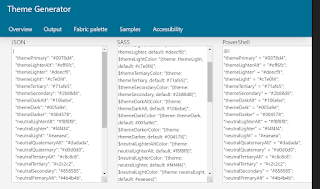

3) Now open the SharePoint Online Management Shell, and connect to your SPO tenant.  

Connect-SPOService -Url "https://tenantName-admin.sharepoint.com/" -Credential "UserName"

4) Enter user password

5) Now Get all Custom themes available in your tenant using 

Get-SPOTheme

6)Now Install the Theme, copy the poweshell theme generated in step 2, and assign to one variable,
    $themePalette = @{
      >> "themePrimary" = "#002b4d";
        >> "themeLighterAlt" = "#ceddea";
          >> "themeLighter" = "#a5c1d6";
            >> "themePrimary" = "#002b4d";
              >> "themeLighterAlt" = "#ceddea";
                >> "themeLighter" = "#a5c1d6"; >> "themeLight" = "#80a6c2";
                  >> "themeTertiary" = "#608daf";
                    >> "themeSecondary" = "#44759b";
                      >> "themeDarkAlt" = "#2d6087";
                        >> "themeDark" = "#194d74";
                          >> "themeDarker" = "#0b3b60";
                            >> "neutralLighterAlt" = "#f8f8f8";
                              >> "neutralLighter" = "#f4f4f4";
                                >> "neutralLight" = "#eaeaea";
                                  >> "neutralQuaternaryAlt" = "#dadada";
                                    >> "neutralQuaternary" = "#d0d0d0";
                                      >> "neutralTertiaryAlt" = "#c8c8c8";
                                        >> "neutralTertiary" = "#b1afaf";
                                          >> "neutralSecondary" = "#989595";
                                            >> "neutralPrimaryAlt" = "#7e7c7c";
                                              >> "neutralPrimary" = "#1a1919";
                                                >> "neutralDark" = "#4c4a4a";
                                                  >> "black" = "#333131";
                                                    >> "white" = "#ffffff";
                                                      >> "primaryBackground" = "#ffffff";
                                                        >> "primaryText" = "#1a1919";
                                                          >> "bodyBackground" = "#ffffff";
                                                            >> "bodyText" = "#1a1919";
                                                              >> "disabledBackground" = "#f4f4f4";
                                                                >> "disabledText" = "#c8c8c8";
                                                                  >> }

                                                                  7) Now Install theme to your tenant using 

                                                                  Add-SPOTheme -Name "ThemeName" -Palette $themePalette -IsInverted $false

                                                                  8) Now you can go in SPO Site Collection, and change the theme, that you installed..

                                                                  January 20, 2020

                                                                  Hide Field in New and Edit Forms of SharePoint Online List using Powershell

                                                                  Hello,

                                                                  Just tried to hide SharePoint List fields from New and Edit Forms,  wrote a powershell script,

                                                                  1. Connect to SharePoint
                                                                  2. Load SharePoint List context,
                                                                  3. Get Field to hide from forms 
                                                                  4. Use functions to hide field from SharePoint forms.

                                                                  #Load SharePoint CSOM Assemblies
                                                                  Add-Type -Path "C:\Program Files\Common Files\Microsoft Shared\Web Server Extensions\15\ISAPI\Microsoft.SharePoint.Client.dll"
                                                                  Add-Type -Path "C:\Program Files\Common Files\Microsoft Shared\Web Server Extensions\15\ISAPI\Microsoft.SharePoint.Client.Runtime.dll"
                                                                     
                                                                  #Config Parameters
                                                                  $SiteURL= "SharePoint Site URL"
                                                                  $ListName="ListName"
                                                                  $FieldName = "ColumnName" #Display Name

                                                                  #Setup Credentials to connect
                                                                  $Cred = Get-Credential
                                                                  $Cred = New-Object Microsoft.SharePoint.Client.SharePointOnlineCredentials($Cred.UserName,$Cred.Password)

                                                                  Try {
                                                                      #Setup the context
                                                                      $Ctx = New-Object Microsoft.SharePoint.Client.ClientContext($SiteURL)
                                                                      $Ctx.Credentials = $Cred
                                                                     
                                                                      #Get the web, List and Field objects
                                                                      $Web=$Ctx.Web
                                                                      $Ctx.Load($Web);
                                                                      $Ctx.ExecuteQuery()

                                                                      $List=$web.Lists.GetByTitle($ListName)
                                                                      $Ctx.Load($List);
                                                                      $Ctx.ExecuteQuery()
                                                                      

                                                                      $Field = $List.Fields.GetByTitle($FieldName)

                                                                      $Ctx.Load($Field);
                                                                      $Ctx.ExecuteQuery()

                                                                      #Hide the column from New & Edit forms
                                                                      $Field.SetShowInEditForm($False)
                                                                      $Ctx.ExecuteQuery()
                                                                      $Field.SetShowInNewForm($False)
                                                                      $Ctx.ExecuteQuery()
                                                                      $Field.UpdateAndPushChanges($True)
                                                                      $Ctx.ExecuteQuery()
                                                                        
                                                                      Write-host -f Green "List Field hidden Successfully!"
                                                                  }
                                                                  Catch {
                                                                      write-host -f Red "Error hiding List Column: " $_.Exception.Message
                                                                  }